
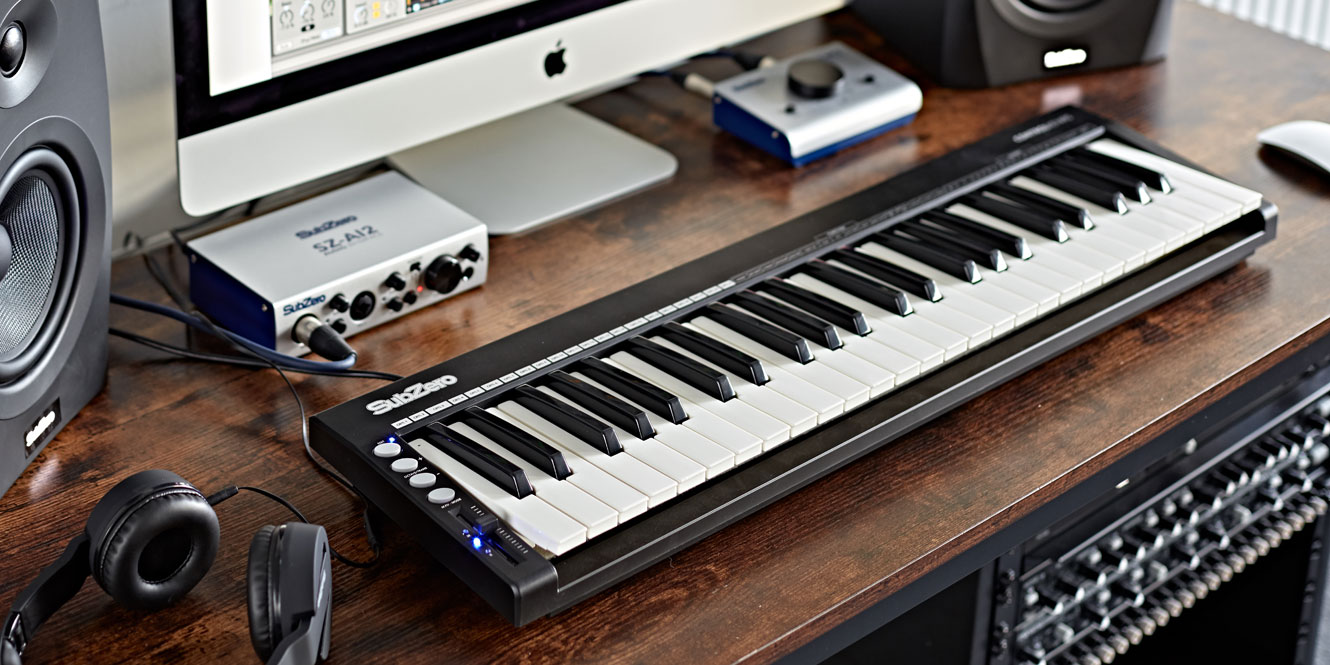
Looking for your first MIDI keyboard? The right controller can help you create beats, play virtual piano, compose melodies, and control music production software without spending a fortune.
This guide compares beginner-friendly MIDI keyboards based on key count, playability, music production features, portability, and software integration. Whether you use Ableton Live, FL Studio, Logic Pro, GarageBand, or another digital audio workstation (DAW), there is an option for your setup.
Important: A standard MIDI keyboard usually does not produce sound by itself. It sends performance information to a computer, mobile device, sound module, or compatible instrument. You normally need music software or another sound source to hear what you play.
Best MIDI Keyboards for Beginners: Comparison Table
| Keyboard | Keys | Best for | Main advantage | Potential drawback |
|---|---|---|---|---|
| Akai MPK Mini IV | 25 mini keys | Beat-making and portability | Pads, knobs, pitch and modulation wheels | Limited range for two-handed playing |
| Novation Launchkey Mini 37 MK4 | 37 mini keys | DAW-based production | Creative chord and scale tools, 16 pads | Mini keys are less piano-like |
| Arturia MiniLab 3 | 25 slim keys | Virtual instruments and sound design | Encoders, sliders, pads, software integration | Short playing range |
| M-Audio Keystation 49 MK3 | 49 full-size keys | Learning notes and chords | More room to play with both hands | Fewer production controls |
| Alesis V49 MKII | 49 full-size keys | Keyboard playing and beat-making | Full-size keys and performance pads | Requires more desk space |
| Nektar SE25 | 25 mini keys | Very simple portable setup | Compact design and basic DAW control | No built-in drum pads or knobs |
Features and software bundles can vary by region, retailer, and product revision. Check the manufacturer’s current specifications before purchasing. Prices are intentionally not fixed here because availability and pricing differ across countries.
1. Akai MPK Mini IV: Best Compact MIDI Keyboard for Beginners
Best all-rounderThe Akai Professional MPK Mini IV is a practical choice for beginners who want to make beats, program drums, and play melodies without dedicating an entire desk to music equipment. Its compact design suits bedroom studios, laptop-based production, and portable recording setups.
The keyboard has 25 velocity-sensitive mini keys, eight RGB MPC-style pads, eight assignable knobs, dedicated pitch and modulation wheels, and an OLED display. The pads are useful for triggering drum sounds and samples, while the knobs can control virtual instrument parameters or other functions in your DAW.
- Key count: 25 mini keys
- Controls: Eight drum pads and eight knobs
- Connectivity: USB-C, full-size MIDI output, and sustain-pedal input
- Useful for: Hip-hop, electronic music, beat-making, and portable production
Why beginners should consider it: The physical pitch and modulation wheels are easy to understand, and the compact control layout gives you plenty to experiment with. Its bundled software can also provide a starting collection of virtual instruments.
What to consider: Twenty-five keys are fine for bass lines, short melodies, and simple chord parts, but you may frequently need to change octaves. It is not the best choice if you want to practice piano with both hands.
See the official Akai MPK range for current product details.
2. Novation Launchkey Mini 37 MK4: Best for DAW Integration
Best for creative productionThe Novation Launchkey Mini 37 MK4 gives beginners more playing range than a typical 25-key controller while remaining compact enough for a small studio. It is especially appealing if you want to control music software directly from the keyboard rather than relying on your mouse for every task.
It includes 37 velocity-sensitive mini keys, 16 RGB pads with polyphonic aftertouch support, eight rotary encoders, an OLED display, and built-in chord, scale, and arpeggiator tools. These features can help you experiment with musical ideas even when you are still learning music theory.
- Key count: 37 mini keys
- Creative tools: Scale Mode, chord modes, and generative arpeggiator
- Controls: 16 pads and eight encoders
- Connectivity: USB-C, MIDI output via a 3.5 mm connection, and sustain-pedal input
- Useful for: Ableton Live, electronic music, clip launching, and software-based composition
Why beginners should consider it: The additional keys give you more room for melodies and chord progressions. Scale and chord functions can make experimenting easier, while dedicated DAW integration reduces the need to configure every control manually in supported software.
What to consider: The mini keys remain smaller than standard piano keys. Also check whether you need a compatible adapter or cable if you plan to connect its MIDI output to external hardware.
Explore the official Launchkey Mini 37 MK4 page for specifications and software information.
3. Arturia MiniLab 3: Best for Virtual Instruments and Sound Design
Best software-focused optionThe Arturia MiniLab 3 is a compact MIDI controller designed for producers who want to interact with virtual instruments, browse presets, and adjust sounds while composing. It is a good fit for beginners who enjoy experimenting with synthesizers, ambient textures, electronic music, and sampled instruments.
It features 25 velocity-sensitive slim keys, eight rotary encoders, four sliders, eight pads across two banks, a small display, and touch-sensitive pitch and modulation controls. A built-in arpeggiator and chord mode offer additional ways to develop musical ideas.
- Key count: 25 slim keys
- Controls: Eight encoders, four sliders, and eight pads per bank
- Connectivity: USB-C, five-pin MIDI output, and pedal input
- Software: Bundled instruments and production software; verify the current package
- Useful for: Synthesizers, sound design, preset browsing, and home studios
Why beginners should consider it: The combination of sliders, knobs, pads, and instrument software makes it easier to explore sound design without constantly opening menus. The five-pin MIDI output is also useful if you eventually add compatible hardware synthesizers.
What to consider: The 25-key range is limiting for two-handed piano parts. Pitch and modulation are controlled with touch strips rather than traditional wheels, which is a matter of personal preference.
Check the official Arturia MiniLab 3 page for the latest bundle and specifications.
4. M-Audio Keystation 49 MK3: Best for Learning Keyboard and Piano Parts
Best straightforward 49-key optionIf your goal is to learn notes, play melodies, and build chord progressions, the M-Audio Keystation 49 MK3 is worth considering. Its 49 full-size keys provide a more familiar layout than mini-key controllers, giving beginners more space to coordinate both hands.
This is a straightforward controller rather than a pad-heavy production surface. That simplicity can be an advantage: you can focus on playing, recording MIDI, and learning your DAW without navigating lots of extra controls.
- Key count: 49 full-size velocity-sensitive keys
- Design: Lightweight controller with basic performance controls
- Useful for: Piano parts, chords, melodies, and general music production
- Best paired with: A DAW and a virtual piano or other software instrument
Why beginners should consider it: You get more playing range without paying for a large collection of production controls you may not need. Full-size keys also provide a familiar starting point for learning keyboard technique.
What to consider: This is not a weighted digital piano. Its keys will not feel like the hammer-action keys of an acoustic piano or a piano-focused digital instrument. If you want to play expressive piano repertoire seriously, compare weighted digital pianos with USB MIDI support before buying.
5. Alesis V49 MKII: Best for Full-Size Keys and Beat-Making Controls
The Alesis V49 MKII is a useful alternative for beginners who want full-size keys along with controls for producing music. Its 49-key layout offers more space for playing than compact controllers, while performance pads and assignable controls can help with drum programming and software instruments.
- Key count: 49 full-size keys
- Best for: Beginners who want keys and pads in one controller
- Consider it if: You want a larger playing range but still need hands-on beat-making controls
Compared with a simple 49-key controller, the extra controls can make beat production more hands-on. However, think about how much desk space you have and whether you will actually use the pads and knobs.
Before buying, verify the current model’s included software and connection requirements with the manufacturer or retailer.
6. Nektar SE25: Best Simple and Portable MIDI Keyboard
The Nektar SE25 is aimed at musicians who need a compact keyboard for a laptop-based setup. Its small footprint makes it useful for travel, limited desk space, and entering notes into a DAW when a full-size controller would be inconvenient.
Its emphasis is on simple note input and practical controls rather than a large array of pads, faders, and knobs. That can be helpful if you want a basic controller without a complicated learning curve.
- Key count: 25 mini keys
- Best for: Travel, small workspaces, and simple MIDI recording
- Trade-off: Fewer hands-on controls than feature-rich alternatives
Choose it if portability and simplicity matter more than playing range. If you plan to play two-handed chords regularly, consider a 37- or 49-key model instead.
Which MIDI Keyboard Should You Buy? Interactive Selector
Answer these quick questions to find a keyboard that fits your beginner setup.
Choose your priorities above and select the button.
How Many Keys Do Beginners Need?
Key count is one of the most important decisions when buying a MIDI keyboard. More keys provide a wider musical range, while fewer keys make the controller easier to fit on a desk or carry in a backpack.
| Key count | Advantages | Best suited to |
|---|---|---|
| 25 keys | Compact, portable, often less expensive | Beat-making, bass lines, short melodies, travel |
| 37 keys | More range without a large footprint | Electronic music, chords, melodies, general production |
| 49 keys | More room for two-handed playing | Learning keyboard parts and composing fuller arrangements |
| 61 keys | Wider range for complex parts and performance | More advanced arrangements and regular keyboard playing |
| 88 keys | Full piano range | Pianists and users seeking a piano-focused instrument |
Our advice: If you mainly create music by recording short parts and arranging them in a piano roll, 25 keys can be enough. If you want to play chords and melodies together, 37 or 49 keys will usually feel less restrictive. If realistic piano practice is a priority, look into a digital piano with weighted keys and MIDI connectivity.
Mini Keys vs. Full-Size Keys
Mini keys reduce the size of the controller and are convenient for travel. They work well for entering notes, creating bass lines, playing short leads, and experimenting with synth parts. However, their smaller spacing can feel cramped when learning piano finger positions.
Full-size keys have a more familiar spacing for people learning keyboard technique. They also make it easier to transfer hand positions from a conventional piano. If you have enough desk space, full-size keys are worth considering even if you are new to music production.
What Features Should Beginners Look For?
1. Velocity-sensitive keys
Velocity sensitivity lets the keyboard send information about how firmly you press a key. A virtual piano can use that information to change volume and tone, while a synthesizer may use it to alter brightness or other parameters. It is one of the most useful features for expressive playing.
2. Drum pads
Drum pads let you trigger kicks, snares, hi-hats, samples, and clips with your fingers. They are especially helpful for beat-making, although they are not essential if you prefer to program drums with a mouse or use your keyboard keys.
3. Knobs, sliders, and transport controls
Assignable knobs and sliders can control volume, filters, effects, virtual instrument parameters, and mixer levels. Transport controls operate functions such as play, stop, and record. They make a controller more hands-on, but beginners should not pay extra for controls they will never use.
4. DAW compatibility
Check that the keyboard works with your preferred music software. Many USB MIDI controllers can send notes to a wide range of DAWs, but the quality of automatic control mapping varies. Dedicated integration can save setup time if you use Ableton Live, Logic Pro, FL Studio, Cubase, or another supported application.
5. Sustain pedal support
A sustain pedal can make piano parts feel more natural by letting notes continue after you release the keys. If you plan to play piano or keyboard parts regularly, look for a controller with a compatible pedal input and check whether the pedal is sold separately.
6. USB and traditional MIDI connections
USB is generally the simplest way to connect a controller to a computer. A five-pin MIDI output is useful if you intend to control external synthesizers or other MIDI-compatible hardware. Some compact controllers use a smaller MIDI connector and require a compatible adapter cable.
7. Included music software
Bundled software can make a first keyboard much better value. A DAW lets you record and arrange performances, while virtual instruments provide piano, drums, strings, synthesizers, and other sounds. Bundles change over time, so confirm which applications, licences, and trial periods are included with the exact model you purchase.
What Software Do You Need for a MIDI Keyboard?
A MIDI controller sends musical information; it does not normally generate the audio you hear. To make music with a computer, you need a DAW or compatible music app and a virtual instrument or sound source.
- Ableton Live: Popular for electronic music, loops, live performance, and production.
- FL Studio: A common choice for beat-making, MIDI programming, and electronic production.
- Logic Pro: A full production environment for supported Apple computers.
- GarageBand: A beginner-friendly option for supported Apple devices.
- Reaper: A flexible DAW with extensive routing and recording capabilities.
Before buying paid software, check whether your MIDI keyboard includes a licence for a DAW or virtual instruments. You can also begin with compatible free software and upgrade when you understand your workflow.
How to Set Up Your First MIDI Keyboard
- Install your music software. Download a DAW or music app that supports MIDI input.
- Connect the keyboard. Use the supplied USB cable or the connection recommended by the manufacturer.
- Open MIDI settings. Enable the controller as an input device if your software does not detect it automatically.
- Load a virtual instrument. Select a piano, synthesizer, drum instrument, or other sound source.
- Play a few notes. Confirm that the DAW receives MIDI input and produces sound.
- Record a short phrase. Start with a simple melody or chord progression and learn how to edit the notes.
Common Mistakes to Avoid When Buying a MIDI Keyboard
- Buying too few keys: A tiny keyboard may become frustrating if you regularly play two-handed parts.
- Confusing a controller with a digital piano: Most MIDI keyboards do not contain built-in speakers or piano sounds.
- Paying for unnecessary controls: Extra pads, faders, and knobs are useful only if they fit your workflow.
- Ignoring the software bundle: Check the included licences and system requirements before assuming everything will work with your computer.
- Forgetting connection requirements: External hardware may require a specific MIDI cable, adapter, or power supply.
- Expecting weighted keys at every price: Most compact production controllers use unweighted synth-style keys.
Beginner MIDI Keyboard Buying Checklist
Use this checklist before placing an order.
Frequently Asked Questions
What is the best MIDI keyboard for beginners in 2026?
The best option depends on your goals. The Akai MPK Mini IV is a versatile compact choice for beat-making. The Novation Launchkey Mini 37 MK4 suits DAW-based production, the Arturia MiniLab 3 is useful for virtual instruments, and the M-Audio Keystation 49 MK3 is a straightforward choice for full-size keys.
Can I use a MIDI keyboard without a computer?
Most standard MIDI controllers need a computer, mobile device, sound module, or compatible hardware instrument to generate sound. Some specialized controllers include built-in sounds, but do not assume that a standard MIDI keyboard can operate as a standalone instrument.
Is a 25-key MIDI keyboard enough for beginners?
Yes, if you mainly make beats, program bass lines, record short melodies, or enter notes into a DAW. A 37- or 49-key model is usually more comfortable if you want to play longer phrases or use both hands at once.
Are MIDI keyboards compatible with FL Studio and Ableton Live?
Many USB MIDI keyboards work with both FL Studio and Ableton Live. However, advanced features such as transport controls, clip launching, and automatic parameter mapping depend on the controller and the software version. Check the manufacturer’s compatibility details.
Do MIDI keyboards come with piano sounds?
Most MIDI controllers do not contain their own piano sounds. You normally load a virtual piano or another instrument in your DAW. Some controllers include software licences or instrument bundles, but the exact package varies by model and promotion.
Should beginners buy a MIDI keyboard with weighted keys?
Not necessarily. Unweighted keys are common for music production and synthesizer playing. If your main goal is to learn piano technique and practice expressive piano music, a digital piano with weighted keys and MIDI connectivity may be a better investment.
Do I need drum pads on my first MIDI keyboard?
No. Drum pads are convenient for triggering samples and programming beats, but you can also use your keyboard keys or the DAW’s piano roll. Prioritize pads if finger-drumming is part of your intended workflow.
Can I connect a MIDI keyboard to an iPad?
Many modern USB MIDI controllers can work with compatible iPads and music apps. You may need an appropriate USB adapter or hub, and some setups require external power. Verify compatibility with both the keyboard and the iPad before buying.
Final Verdict: Which Beginner MIDI Keyboard Is Worth Buying?
For a compact first controller, the Akai MPK Mini IV offers a useful combination of keys, pads, knobs, and physical pitch and modulation wheels. If you want more playing range and creative controls for your DAW, the Novation Launchkey Mini 37 MK4 is a strong alternative. The Arturia MiniLab 3 is worth considering for virtual instrument control, while the M-Audio Keystation 49 MK3 makes sense for beginners who prefer full-size keys over a large set of production features.
Ultimately, buy for the way you plan to make music—not the longest feature list. A controller that fits your workspace, works with your software, and feels comfortable to play is more valuable than one with features you never use.
Editorial note: Product features and software bundles can change. Confirm specifications, compatibility, local availability, and current pricing on the official manufacturer’s website or with an authorized retailer before purchasing.