
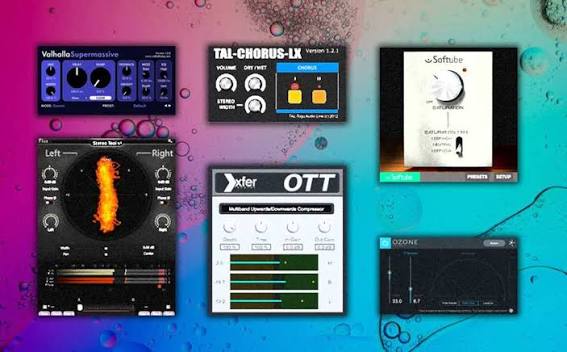
You do not need to spend hundreds of dollars on music production software to create great-sounding tracks. Some of the best free VST plugins provide powerful synthesizers, professional-style EQ, creative effects, sampled instruments, and mixing tools that can handle serious projects.
Whether you use FL Studio, Ableton Live, Logic Pro, Reaper, or another compatible DAW, the right plugins can expand your sound library and improve your workflow without increasing your budget.
This guide covers the best free VST plugins for beginners and experienced producers, explains what each one does, and shows you how to choose compatible versions for your computer and DAW.
Best Free VST Plugins: Quick Comparison
Start with the tools that solve a specific production problem. You do not need every plugin on this list; a small collection of reliable instruments and effects can cover most beginner projects.
| Plugin | Category | Best For | Cost |
|---|---|---|---|
| Vital | Wavetable synthesizer | Bass, leads, pads, modern electronic sounds | Free tier; optional paid content |
| Surge XT | Hybrid synthesizer | Sound design, electronic music, evolving textures | Free and open source |
| Spitfire Audio LABS | Sampled instruments | Piano, strings, textures, cinematic sounds | Free offerings; check current library terms |
| Native Instruments Komplete Start | Instrument and effects bundle | A broad beginner sound library | Free bundle; optional paid products |
| TDR Nova | Dynamic EQ | Corrective EQ, harshness, tonal balance | Free edition |
| TDR Kotelnikov | Compressor | Transparent dynamics control | Free edition |
| Valhalla Supermassive | Reverb and delay | Large spaces, echoes, ambient effects | Free |
| Voxengo SPAN | Spectrum analyzer | Visual frequency analysis | Free |
| Youlean Loudness Meter | Loudness meter | Checking loudness and dynamics | Free edition; optional Pro features |
| Xfer OTT | Multiband compressor | Bright, aggressive electronic sounds | Freeware |
Plugin formats and supported operating systems vary by developer and release. Confirm compatibility on each official download page before installing.
Best Free VST Synthesizers and Instruments
1. Vital — Best Free Synthesizer for Modern Sounds
Type: Wavetable synthesizer
Best for: EDM, bass music, synthwave, pop, trap, cinematic textures
Official website: Vital Audio
Vital is a powerful wavetable synthesizer with a visual modulation system that makes sound design easier to understand. You can create basses, leads, pads, plucks, and evolving effects by combining oscillators, filters, envelopes, and modulation sources.
Its visual interface is especially helpful for beginners. Instead of guessing what a modulation source is doing, you can see how parameters change as your sound plays. The free tier offers a substantial synthesis engine, while optional paid tiers provide additional content.
Why download Vital?
- Build custom basses, leads, pads, and atmospheric sounds.
- Learn synthesis through visual modulation.
- Use presets as a starting point for your own patches.
- Explore modern wavetable sound design without buying a premium synth.
Potential drawback: The number of controls can be intimidating at first, and optional preset packs may cost extra.
Get Vital2. Surge XT — Best Free Synth for Deep Sound Design
Type: Hybrid synthesizer
Best for: Electronic music, experimental sounds, evolving pads, bass design
Official website: Surge XT
Surge XT is a free, open-source synthesizer with a broad range of synthesis methods, modulation options, filters, and effects. It can handle conventional synthesizer sounds as well as unusual textures and experimental patches.
Its depth makes it an excellent companion to Vital. Where Vital is particularly approachable for visual wavetable modulation, Surge XT offers another broad sound-design environment with many ways to shape and combine sounds.
Why download Surge XT?
- Explore a wide range of synthesis methods.
- Create basses, leads, pads, and unusual textures.
- Access a large selection of factory presets.
- Use a genuinely free and open-source instrument.
Potential drawback: The interface and depth can require more learning than a simple preset-based instrument.
Download Surge XT3. Spitfire Audio LABS — Best Free Sampled Instruments
Type: Sampled instrument collection
Best for: Piano, strings, ambient music, soundtracks, songwriting
Official website: Spitfire Audio
Sampled instruments are useful when a synthesizer is not the sound you want. Spitfire Audio has offered a range of free instrument libraries and sounds suitable for cinematic arrangements, gentle piano parts, atmospheric layers, and songwriting.
Check the developer’s current free collection and installation requirements, because its product lineup and player workflow can change. Some libraries may require a dedicated player or account.
Why download free Spitfire instruments?
- Add organic sounds to electronic productions.
- Build piano, string, and atmospheric arrangements.
- Layer sampled sounds with synthesizers.
- Find inspiration when a standard synth patch feels too artificial.
Potential drawback: Sample libraries can use considerable storage space, and individual products have different installation requirements.
Explore Free Instruments4. Native Instruments Komplete Start — Best Free Instrument Bundle
Type: Instrument, effects, and sound bundle
Best for: Beginners who want many sounds in one download
Official website: Native Instruments Free Collection
Komplete Start is a convenient entry point into the Native Instruments ecosystem. Its free collection has included instruments, effects, and sounds that can expand a DAW without purchasing a large commercial bundle.
Depending on the current bundle, you may find tools for keys, synths, effects processing, and sound exploration. Read the current product listing to confirm exactly what is included and whether additional software is required.
Why download Komplete Start?
- Get several types of sounds and effects from one ecosystem.
- Explore different instruments without purchasing them individually.
- Build a starter library for songwriting and production.
Potential drawback: Some content uses a dedicated player or manager, and other products in the ecosystem are paid.
Get Free NI PluginsBest Free VST Effects for Mixing and Mastering
5. TDR Nova — Best Free EQ Plugin
Type: Parallel dynamic equalizer
Best for: Vocal clarity, harsh frequencies, tonal balance, mixing
Official website: Tokyo Dawn Labs TDR Nova
Equalization helps you control the tonal balance of individual tracks. TDR Nova combines EQ with dynamic processing, allowing a frequency range to be reduced more strongly when it becomes too prominent.
For example, you can use dynamic EQ to tame a harsh vocal frequency or control a resonant sound without permanently reducing that frequency by the same amount throughout the performance.
Why download TDR Nova?
- Learn basic EQ and dynamic EQ techniques.
- Address harshness and resonances in vocals and instruments.
- Shape individual tracks and refine tonal balance.
- Access useful corrective mixing tools at no cost.
Potential drawback: Dynamic EQ offers more controls than a simple three-band equalizer, so take time to learn the threshold and frequency settings.
Download TDR Nova6. TDR Kotelnikov — Best Free Compressor for Transparent Dynamics
Type: Compressor
Best for: Mix buses, dynamic control, transparent compression
Official website: Tokyo Dawn Labs TDR Kotelnikov
A compressor reduces the difference between louder and quieter parts of a signal. TDR Kotelnikov is designed for controlled, transparent compression, making it useful when you want to manage dynamics without adding obvious distortion or coloration.
It can be useful on a mix bus or selected tracks, but beginners should learn the basics of threshold, ratio, attack, release, and gain compensation before applying heavy compression.
Why download TDR Kotelnikov?
- Learn the fundamentals of compression.
- Control dynamic peaks without radically changing tone.
- Explore subtle mix-bus compression.
- Complement your EQ and other mixing tools.
Potential drawback: Transparent compression can be less immediately obvious than a creative effect, so use level-matched comparisons when learning.
Get TDR Kotelnikov7. Valhalla Supermassive — Best Free Reverb and Delay
Type: Reverb and delay
Best for: Ambient pads, vocals, synths, cinematic textures, long echoes
Official website: Valhalla Supermassive
Valhalla Supermassive creates large, atmospheric spaces and complex echoes. It is particularly effective when you want a simple sound to become wide, distant, or cinematic.
Use it on synthesizers, vocal effects, guitar parts, and transitions. It can also turn short sounds into evolving textures for ambient and electronic music.
Why download Supermassive?
- Create huge reverb tails and rhythmic echoes.
- Add depth to dry synthesizers and vocals.
- Design atmospheric transitions and soundscapes.
- Experiment with creative effects without buying a premium reverb.
Potential drawback: Long or dense effect tails can clutter a mix. Use the mix control and decay settings carefully.
Download Supermassive8. Voxengo SPAN — Best Free Spectrum Analyzer
Type: Real-time spectrum analyzer
Best for: Understanding frequency balance and low-end energy
Official website: Voxengo SPAN
SPAN shows how the energy in an audio signal is distributed across the frequency spectrum. It is useful for examining bass and kick relationships, finding strong frequency peaks, and learning how different sounds occupy the spectrum.
A spectrum analyzer cannot tell you whether a mix sounds good on its own. Use it alongside careful listening and reliable headphones or monitors.
Why download SPAN?
- Visualize low, mid, and high-frequency energy.
- Compare the spectral balance of tracks and mixes.
- Learn how EQ changes the shape of a signal.
- Support your ears with objective visual information.
Potential drawback: Beginners can spend too much time chasing a visually flat spectrum. Music does not need a perfectly flat frequency curve to sound balanced.
Get Voxengo SPAN9. Youlean Loudness Meter — Best Free Loudness Meter
Type: Loudness and level metering
Best for: Integrated loudness, true peak, mastering checks
Official website: Youlean Loudness Meter
Loudness meters help you understand how loud a finished track is over time. Youlean Loudness Meter provides useful measurements for evaluating a mix or master, including loudness information relevant to online distribution.
It is important to distinguish loudness from sound quality. Increasing loudness does not automatically make a mix better, and different platforms may apply their own playback-level adjustments.
Why download Youlean?
- Measure integrated loudness and other useful level metrics.
- Check a finished export rather than relying only on peak meters.
- Learn the difference between peak level and perceived loudness.
Potential drawback: Some advanced features are reserved for the paid edition. Check the current free-tier capabilities.
Download Youlean Meter10. Xfer OTT — Best Free Effect for Aggressive Electronic Sounds
Type: Multiband compressor
Best for: EDM leads, basses, synths, dramatic sound design
Official website: Xfer Records Freeware
OTT is known for an aggressive multiband compression effect that can bring out detail, brightness, and intensity in electronic sounds. It is popular for processing synths, basses, and other elements that need to stand out in a dense production.
Because the effect can be strong, it is usually best to start with a low amount and increase it gradually. Use it as a creative effect rather than applying it automatically to every track.
Why download OTT?
- Add density and brightness to selected sounds.
- Bring out detail in electronic instruments.
- Experiment with a recognizable sound-design technique.
Potential drawback: Excessive processing can make sounds harsh, noisy, or fatiguing. It is not a substitute for balanced mixing.
Get Xfer FreewareWhich Free VST Plugin Should You Download First?
Choose your main goal and DAW to get a practical starting recommendation.
Your recommendation
Choose your preferences and click “Find My Plugin” to see which tool best fits your needs.
VST, VST3, AU, and AAX: Which Plugin Format Do You Need?
Before downloading a plugin, make sure it uses a format your DAW supports. The word “VST” is often used casually to describe audio plugins, but several different plugin standards exist.
| Format | Common Use | What to Know |
|---|---|---|
| VST3 | Many Windows and macOS DAWs | A common modern plugin format. Verify your DAW supports the version offered. |
| VST2 | Older and compatible DAW setups | Legacy format; support varies, and some DAWs no longer support it. |
| AU / Audio Units | macOS applications such as Logic Pro and GarageBand | Choose the AU version when required by your Apple DAW. |
| AAX | Pro Tools | Pro Tools generally requires compatible AAX plugins. |
| CLAP / LV2 | Supported DAWs, often including certain Linux workflows | Compatibility depends on the host application and operating system. |
Important for Logic Pro users: Logic Pro does not load VST plugins directly. Look for the AU version of the plugin. GarageBand also uses Audio Units on macOS. A plugin may support multiple formats, but not every developer provides every format.
Check 64-bit and operating system compatibility
Most current DAWs use 64-bit plugins. Confirm that the download supports your version of Windows or macOS, your processor architecture, and any Apple silicon requirements. If you use an older computer, check the developer’s archived or compatibility documentation before installing.
How to Install Free VST Plugins
The exact process depends on the developer, operating system, and DAW. These steps cover a typical desktop installation.
- Visit the official developer website. Use the links in this guide rather than downloading installers from unfamiliar mirror sites.
- Choose the correct format. Select VST3 for a compatible VST host, AU for Logic Pro on macOS, or another supported format for your DAW.
- Download and install the plugin. Follow the developer’s instructions. Some products use a dedicated installer or application manager.
- Open your DAW. If the plugin does not appear, open the plugin settings and scan or rescan the relevant folder if the DAW offers that option.
- Load it on the correct track. Synths and sampled instruments normally go on instrument or MIDI tracks. EQ, compression, reverb, and meters usually go on audio or instrument channels.
- Save and test your project. Confirm the plugin loads correctly, then save the project before continuing.
Build a Complete Free Plugin Setup
You can assemble a useful production toolkit without downloading every plugin available. Start with a few complementary tools and add more only when you have a specific need.
| Production Task | Recommended Plugin | How to Use It |
|---|---|---|
| Write melodies and basslines | Vital | Create a sound or start from a preset. |
| Explore deeper sound design | Surge XT | Build evolving textures, pads, and experimental patches. |
| Add organic instruments | Spitfire Audio’s free instruments | Layer sampled piano, strings, or other sounds. |
| Correct tonal problems | TDR Nova | Use EQ to reduce resonances or balance frequencies. |
| Control dynamics | TDR Kotelnikov | Apply compression when a signal needs more consistent dynamics. |
| Add atmosphere | Valhalla Supermassive | Create space and echoes on selected sounds. |
| Inspect the frequency spectrum | Voxengo SPAN | Check frequency distribution while listening critically. |
| Check final loudness | Youlean Loudness Meter | Measure your exported mix or master. |
This collection covers synthesis, sampled sounds, EQ, compression, spatial effects, analysis, and loudness measurement. That is enough to start creating and mixing complete tracks before buying additional software.
Common Mistakes to Avoid When Using Free VST Plugins
Downloading too many plugins
Collecting dozens of free plugins can become a distraction. Choose one synthesizer, one EQ, one compressor, and one reverb. Learn how they work before adding more tools.
Using effects without a clear purpose
Reverb, compression, and saturation can make a track sound better, but too much processing can reduce clarity. Ask what problem each plugin is solving or what creative effect it is intended to produce.
Ignoring CPU and memory use
Some instruments and sample libraries use significant processing power or RAM. If a project becomes unstable, reduce the number of active instances, freeze or render tracks where supported, or use lighter presets.
Assuming free means unrestricted commercial use
The plugin license and the licenses for included samples or presets may have different conditions. Check the developer’s terms before distributing commercial releases, sample packs, or preset collections.
Ignoring level matching
A louder signal often sounds more impressive during a quick comparison. When testing EQ, compression, or saturation, match the output levels as closely as possible so you can judge whether the processing genuinely improves the sound.
Frequently Asked Questions About Free VST Plugins
What is a VST plugin?
A VST plugin is a software instrument or audio effect that runs inside a compatible music production application. Instruments generate or play sounds, while effects process audio using tools such as EQ, compression, reverb, and delay.
Are free VST plugins safe to download?
They can be safe when downloaded from the developer’s official website or a trusted distribution platform. Avoid cracked software and suspicious installers, and review the requested permissions before installing.
What is the best free VST plugin for beginners?
Vital is a strong first choice if you want to create your own synthesizer sounds. If you mainly need mixing tools, start with TDR Nova. If you want a free effect for atmosphere, try Valhalla Supermassive.
Can I use free VST plugins in FL Studio?
Yes. FL Studio supports compatible plugin formats, including VST3. Install the appropriate version and scan for it if it does not appear automatically.
Can I use VST plugins in Ableton Live?
Yes. Ableton Live supports compatible VST plugins on its supported operating systems. Check the plugin format and system requirements for your Live version.
Can I use VST plugins in Logic Pro?
Logic Pro does not load VST plugins directly. On macOS, use the Audio Units (AU) version of a plugin when available and compatible with your system.
Are free VST plugins good enough for professional music?
Yes. Free plugins can be used in professional productions. Results depend on how you use the tools, your source material, arrangement, monitoring environment, and mixing decisions rather than the plugin’s price alone.
Do free plugins work on Mac and Windows?
Many support both platforms, but not all do. Check the official download page for supported operating systems, CPU architecture, and plugin formats before installing.
Can I sell music made with free VST plugins?
Usually, plugin licenses allow you to use the resulting sounds in music, but terms vary. Check the license for the plugin, its samples, and any included presets, especially if you plan to redistribute those sounds separately.
Do free VST plugins expire?
Many are permanently free, while others have paid upgrades or optional subscriptions. A trial is different from a free edition, so check whether the download is genuinely free and whether any time limits or feature restrictions apply.
Final Verdict: Which Free VST Plugins Should You Download Today?
You can build a capable music production toolkit without paying for premium software. Start with plugins that complement your DAW and fill gaps in your workflow.
- Vital: Best starting point for modern synthesizer sounds.
- Surge XT: Excellent for deeper sound design and open-source synthesis.
- Spitfire Audio’s free instruments: Useful for adding sampled, organic sounds.
- TDR Nova: A strong choice for corrective EQ and tonal control.
- TDR Kotelnikov: Useful for learning transparent compression.
- Valhalla Supermassive: A creative reverb and delay for spacious effects.
- Voxengo SPAN: Helpful for visual frequency analysis.
- Youlean Loudness Meter: Useful for checking loudness when preparing a mix.
- Xfer OTT: A creative option for aggressive electronic processing.
Install two or three tools first, learn their controls, and use them in a real project. A small set of well-understood plugins is more valuable than a huge collection you rarely open.