
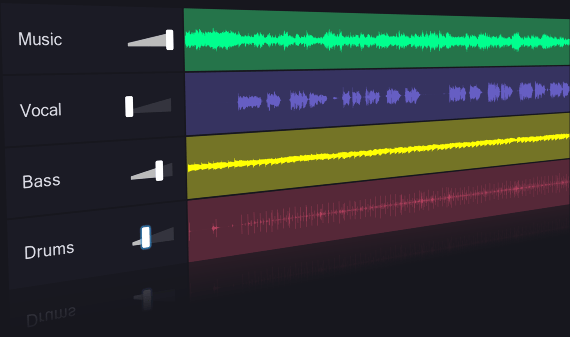
Want to remove vocals from a song, create a karaoke backing track, isolate drums for a remix, or extract an acapella for music production? AI vocal removers and stem separation tools can split a finished recording into separate audio components without requiring the original studio session.
Modern AI tools can separate vocals, drums, bass, guitar, piano, and other instruments from a mixed audio file. Some work entirely in your browser, while others run on your computer or integrate with music production software.
Updated for 2026. Free limits, model availability, export formats, and subscription features can change. Check the provider’s current terms before uploading important recordings.
Best AI Vocal Removers and Stem Separation Tools at a Glance
These tools are not identical. Some specialize in extracting vocals and instrumentals, while others split a song into multiple stems for remixing, practice, and production.
| Tool | Best for | Free access | Main limitation |
|---|---|---|---|
| Moises | Musicians, practice, and multistem workflows | Limited free separations | Advanced models and higher limits may require a paid plan |
| LALAL.AI | Online vocal and instrument extraction | Free previews or limited processing | Full downloads and processing limits depend on the plan |
| Fadr | Remixes, stems, and music analysis | Free Basic tier | Advanced stem types and some export features may be paid |
| Ultimate Vocal Remover | Free desktop separation | Free software | Requires installation and local processing resources |
| BandLab Splitter | Browser-based music practice | Free stem-splitting features | Some advanced features and exports may require membership |
| Gaudio Studio | Vocal and instrument separation online | Limited free processing may be available | Output formats and limits depend on the current offer |
| Demucs | Technical users and local processing | Open-source software | Setup may require command-line experience or a compatible interface |
Free access does not always mean unlimited processing, lossless exports, or commercial rights. Verify current plan details before choosing a tool for a regular production workflow.
1. Moises: Best AI Vocal Remover for Musicians
Moises
Separate vocals and instruments, practice along with songs, adjust playback, and explore chord and tempo tools.
Free option: A limited number of track separations is available without a paid subscription.
Try MoisesMoises is a strong choice for singers, guitarists, drummers, keyboard players, and producers who want to work with an existing recording. Instead of simply removing vocals, the platform can separate a track into different instrumental components.
Depending on the available model and plan, you can isolate vocals, drums, bass, guitar, keys, and other parts. You can then mute individual stems, adjust their levels, or practice along with a song at a suitable tempo.
Key features
- Vocal and instrumental separation.
- Multistem extraction for supported instruments.
- Tempo and pitch controls for music practice.
- Chord detection and musician-oriented tools.
- Web, desktop, and mobile workflows.
Pros and cons
Pros: Useful for learning songs, rehearsing with a band, creating practice tracks, and preparing audio for remixing.
Cons: Free usage is limited, and some advanced separation models, formats, and processing allowances are reserved for paid plans.
Best for: Musicians who want more than a simple vocal remover.
Official details: Moises Vocal Remover and Moises Stem Separation.
2. LALAL.AI: Best Online AI Stem Separator
LALAL.AI
Extract vocals, instrumentals, and individual instrument categories through an online interface.
Free option: Limited previews or processing are available; full export access depends on the current plan.
Try LALAL.AILALAL.AI is designed for people who want to separate a finished recording without installing a complicated desktop application. Upload a supported audio or video file, choose the parts you want to isolate, and preview the results.
Its available separation options extend beyond the basic vocal-and-instrumental split. Depending on the model and current offering, you may be able to extract drums, bass, guitar, piano, synthesizers, strings, or other categories.
What makes LALAL.AI useful?
- Convenient online workflow.
- Multiple stem categories and vocal-separation options.
- Useful for remix preparation, samples, and instrumental extraction.
- Additional applications and integrations for supported workflows.
Pros and cons
Pros: Easy to access, suitable for targeted extraction, and offers more than one type of separation.
Cons: Free previews are not the same as unlimited downloadable stems. Processing allowances and payment options can change.
Best for: Producers who want to extract particular elements from songs using a browser.
3. Fadr: Best AI Stem Separator for Remixes
Fadr
Separate songs into stems and explore music-production features such as remixing and track analysis.
Free option: A free Basic tier is available; advanced features depend on the plan.
Explore FadrFadr is worth considering if you want to transform an existing song into material for a remix or DJ project. Its music tools combine stem separation with other useful features for exploring and rearranging tracks.
Instead of creating only an instrumental version, you can use separated parts to experiment with vocals, drums, bass, and other elements. This can help you plan a mashup, create a practice edit, or develop a new arrangement.
Key benefits
- Stem separation for remix-oriented workflows.
- Tools for exploring musical structure and track characteristics.
- A free entry point for trying the platform.
- Paid options for users who need additional capabilities.
Pros: Combines stem separation with features that can be useful for remixing and music discovery.
Cons: Not every stem type, export format, or advanced feature is necessarily included in the free tier.
Best for: DJs, remixers, and creators who want to manipulate separated musical parts.
4. Ultimate Vocal Remover: Best Free Desktop Tool
Ultimate Vocal Remover
A desktop application that uses different source-separation models to isolate vocals and instruments.
Price: Free to use. Your computer handles the processing.
Get Ultimate Vocal RemoverUltimate Vocal Remover (UVR) is an excellent option for users who want to separate audio without paying for an online subscription. Unlike browser services, it runs on your computer using supported AI separation models.
Its interface brings several model options into one application, making it possible to compare different approaches to vocal isolation and multistem separation. The best model can vary depending on the source recording and the part you want to extract.
Advantages of local processing
- No recurring subscription is required for the open-source application.
- Audio can be processed locally rather than uploaded to a commercial website.
- Different separation models can produce different results.
- Suitable for users who process many tracks and have compatible hardware.
What should you know before installing it?
AI separation can be computationally demanding. Processing speed depends on your computer, available memory, hardware acceleration, and selected model. Installation and model setup may also require more effort than using an online service.
Best for: Producers, hobbyists, and audio enthusiasts who want a free local workflow and do not mind some technical setup.
5. BandLab Splitter: Best for Quick Online Practice
BandLab Splitter
Separate audio into musical components within BandLab’s music creation ecosystem.
Explore BandLabBandLab is a practical option for people who want to split a song and continue working with audio in the same broader music-making environment.
A stem splitter can be useful for creating practice tracks, isolating a vocal performance, or learning how different elements contribute to a mix. BandLab’s browser-based approach can also reduce the need to install a separate desktop application.
Why choose BandLab?
- Accessible music-making tools for beginners.
- Useful for practice and early-stage production.
- Integration with a wider music creation and collaboration environment.
Check the current availability of Splitter, the supported number of stems, export formats, and membership restrictions before relying on it for a professional workflow.
Best for: Beginners and musicians who want a straightforward way to experiment with songs and continue creating music online.
6. Gaudio Studio: Best for Online Vocal and Instrument Separation
Gaudio Studio
A web-based audio separation service with options for extracting vocals and musical components.
Try Gaudio StudioGaudio Studio offers another browser-based route for separating vocals and instruments from a finished mix. It can be worth testing if you want to compare the quality of different AI separation services on the same source recording.
As with any automated separator, results depend on the recording. A clear vocal over a relatively simple arrangement may separate more cleanly than a heavily processed vocal layered with guitars, synthesizers, and reverberation.
Review the current free allowance, output quality, supported formats, and licensing terms before using it for ongoing work.
Best for: Users who want to compare online separation services without installing desktop software.
7. Demucs: Best Open-Source Option for Technical Users
Demucs
An open-source music source-separation project that can separate a mix into vocals, drums, bass, and other components with supported models.
View Demucs on GitHubDemucs is worth considering if you want to build a local audio-separation workflow or integrate separation into a technical project. It is not a polished one-click consumer website, but it can provide flexibility for users who are comfortable with software installation and model execution.
For a simpler desktop experience, some users run Demucs-based models through a graphical interface such as Ultimate Vocal Remover. This can make model selection and file handling easier than working directly from a command line.
Best for: Developers, technically confident musicians, and users who want local processing without a subscription.
Which AI Vocal Remover Should You Choose?
Select your main goal to see which option is a sensible starting point.
What Is AI Stem Separation?
Stem separation is the process of splitting a finished audio recording into individual musical components. In a traditional recording session, a producer may have separate files for vocals, drums, bass, keyboards, and guitars. A stem separator attempts to reconstruct these parts from the final mixed recording.
AI-based tools analyze patterns in the audio and estimate which sounds belong to different sources. Depending on the model, they may be able to produce two, four, or more separate stems.
Vocal removal vs. stem separation
These terms are related, but they are not identical.
- Vocal removal: Attempts to remove the vocals and leave an instrumental version of the song.
- Vocal isolation: Attempts to extract the lead or backing vocals while reducing the instrumental sound.
- Stem separation: Divides the recording into categories such as vocals, drums, bass, and other instruments.
- Multistem separation: Produces more detailed parts, potentially including guitar, piano, strings, or other sources, depending on the tool.
What can you do with separated stems?
- Create karaoke or instrumental practice tracks.
- Study how a song is arranged and mixed.
- Extract vocals for authorized remixes or edits.
- Adjust the relative levels of instruments in a practice session.
- Prepare audio material for remixing, DJ practice, or music analysis.
- Explore the structure of a mix before creating your own arrangement.
How to Get Cleaner Results from an AI Vocal Remover
Even the best AI stem separator can leave unwanted sounds behind. Vocal reverb may remain in an instrumental, cymbals may leak into a vocal stem, or bass frequencies may become less defined after separation. The following techniques can help you get better results.
1. Start with the highest-quality source file
Use a high-quality file from a legitimate source. A lossless WAV or FLAC file is often preferable when available. A heavily compressed MP3 or an audio file recorded from speakers may introduce artifacts that make separation more difficult.
2. Choose the right separation model
Some models are optimized for vocals, while others focus on drums, bass, or broader instrument categories. If a service offers several models, compare the output rather than assuming that the default setting will always be best.
3. Preview before downloading
Listen to the extracted stem on its own and alongside the original recording. Check for missing consonants, watery artifacts, leftover vocal echoes, and instruments that have been partially removed.
4. Test more than one tool
Different AI models can produce noticeably different results from the same song. If the vocal is particularly difficult to isolate, compare two services or use a different model in your desktop application.
5. Apply gentle cleanup after separation
Equalization, noise reduction, and careful editing can help reduce some unwanted residue. Avoid aggressive processing that removes useful frequencies or makes the isolated stem sound unnatural.
6. Understand the limits of separation
AI separation estimates the original components; it does not recover the exact studio recordings. Instruments that overlap in frequency or share heavy reverb and distortion can be difficult to separate perfectly. Keep the original mix available for reference.
Is It Legal to Remove Vocals from a Song?
Using a vocal remover for personal practice is different from distributing a remix or publishing an instrumental version of someone else’s copyrighted song. Separating a recording does not automatically give you permission to reproduce, distribute, or monetize the resulting audio.
Before publishing a karaoke track, remix, acapella, or instrumental, consider both the sound recording rights and the rights in the underlying musical composition. The applicable rules depend on your country and intended use.
Can you upload separated stems to YouTube?
It depends on the source material, the rights you hold, and the use you intend to make of the stems. A separated instrumental may still contain protected musical material, and an isolated vocal may still use the original copyrighted recording. Check the relevant permissions and platform rules before uploading.
Is local processing more private?
Local processing can reduce the need to upload audio to an online service, which may be useful for unreleased music or sensitive recordings. However, check whether the application downloads models, sends telemetry, or uses other online features. Review the software license and privacy documentation rather than assuming that every desktop tool is completely offline.
Free AI Vocal Remover vs. Paid Stem Separation
| Feature | Free tools | Paid tools |
|---|---|---|
| Processing limits | May include daily, monthly, or file-size limits | Often offers larger allowances or additional credits |
| Audio quality | Can be excellent, depending on the model | May include advanced models or higher-quality processing |
| Downloads | May be limited or restricted to certain formats | Often includes more export options |
| Stem categories | Often includes vocals and a few instruments | May offer more detailed instrument separation |
| Batch processing | Can be limited or require local setup | May offer higher limits or workflow integrations |
| Commercial rights | Must be checked separately | Must also be checked; paying does not clear the source music |
A paid subscription is not automatically necessary. If you only need a karaoke track occasionally, a free tool may be sufficient. If you process many recordings, need higher-quality exports, or depend on detailed stem separation for paid projects, compare the total cost of the available plans.
Frequently Asked Questions
What is the best AI vocal remover?
Moises and LALAL.AI are strong starting points for online vocal separation. Moises is particularly useful for musicians who also want practice tools, while LALAL.AI offers a range of stem-separation options. The best result depends on the recording and the vocal you want to extract.
What is the best free AI stem separator?
Ultimate Vocal Remover is an excellent free desktop option for users comfortable with local installation. Fadr and BandLab are worth exploring for browser-based workflows, while Moises provides a limited free tier for music practice and separation.
Can AI remove vocals completely?
AI can often reduce vocals substantially, but complete removal is not guaranteed. Reverb, backing vocals, harmonies, and overlapping instruments may remain in the instrumental track.
Can I isolate vocals from any song?
Many tools can process a wide range of recordings, but the results vary. Songs with dense arrangements, heavy distortion, overlapping vocal layers, or strong effects can be more difficult to separate cleanly.
Can I separate drums and bass with AI?
Yes. Multistem tools such as Moises, LALAL.AI, and Fadr offer supported workflows for separating drums, bass, and other musical elements. Available stem categories depend on the service and plan.
Is Ultimate Vocal Remover completely free?
Ultimate Vocal Remover is free desktop software. Your costs may include computer hardware, storage, and time spent installing or configuring models. Review the licenses for the software and the individual models you use.
Can I use a vocal remover on my phone?
Yes. Mobile-friendly services and apps, including Moises, let you upload audio, separate vocals and instruments, and work with the resulting parts. Free usage limits and download options vary.
Can I use separated stems in a commercial remix?
Only if you have the necessary rights or permissions. Removing vocals or splitting a recording does not remove copyright restrictions on the original recording or composition.
Does AI stem separation reduce audio quality?
It can introduce artifacts because the model estimates the original components from a combined recording. The extent varies by model and source material. Use a high-quality source file, compare different models, and listen carefully before using the stems in a final production.
Final Verdict: Which AI Vocal Remover Should You Use?
For most musicians, Moises is an excellent place to start because it combines vocal and instrument separation with practical music-learning features. Choose LALAL.AI if you want a focused online separator, or Fadr if you are interested in remixing and exploring musical parts.
If avoiding subscription costs is your top priority, try Ultimate Vocal Remover on your computer. It offers a flexible local workflow, although you may need to spend time installing the application and configuring its models.
Whichever tool you choose, compare the actual audio results, check the export limits, and confirm that your intended use is permitted. The cleanest stem is not always the one produced by the service with the most features.
Try Moises