
AI music generators make it easier than ever to create background tracks, intros, soundtracks, and original songs for YouTube. But generating a song with artificial intelligence does not automatically make it copyright-free or guarantee that your video will avoid Content ID claims.
This guide explains how to choose an AI music generator, check commercial-use permissions, keep evidence of your license, and respond if YouTube flags your video.
Quick Answer: How Do You Avoid Copyright Claims With AI Music?
Follow these steps before publishing a video that contains AI-generated music:
- Choose a music generator whose current terms allow your intended use, including monetization if applicable.
- Check whether your particular song was generated under a free or paid plan and which license applies to it.
- Use original prompts, lyrics, and source material rather than uploading copyrighted songs or copying a specific artist’s recording.
- Save the original audio file, generation date, subscription receipt, license terms, and any relevant project details.
- Review the finished track for recognizable samples, melodies, vocals, or other material that could raise rights concerns.
- Upload your video privately or unlisted first, when appropriate, and review YouTube Studio’s copyright checks before publishing.
- If a claim appears, read its details and dispute it only when you have a valid basis.
These steps reduce avoidable risks, but they cannot guarantee that an automated system or rights holder will never flag the audio.
1. Understand YouTube Copyright Claims and Content ID
YouTube uses Content ID to identify audio and video that matches material submitted by participating copyright owners. When a match is detected, the rights holder can apply a policy that affects how the video is handled.
Content ID claim
A rights holder has identified a possible match. Depending on the policy, the video may be monetized by the claimant, tracked, or blocked in certain regions or worldwide.
Usually: A claim is not automatically a copyright strike.
Copyright strike
A strike generally follows a valid copyright removal request. It is more serious than a standard Content ID claim and can affect your channel.
Action: Read YouTube’s notice carefully and follow the official resolution process.
A claim does not necessarily mean you intentionally infringed copyright. Automated matching can flag material for different reasons, including disputed or incorrectly registered reference audio. However, having generated a track with AI is not, by itself, proof that a claim is invalid.
Read YouTube’s official explanation of Content ID claims and its guide to copyright strikes.
2. Choose an AI Music Generator With the Right License
AI music services have different rules. Some free plans restrict commercial use, while paid plans may grant broader permissions for tracks created during an active subscription. Read the terms for the exact service, plan, and date on which you generated the music.
| Music source | What to verify | Risk-reduction tip |
|---|---|---|
| YouTube Audio Library | Whether the selected track requires attribution and any listed conditions. | Follow the track’s instructions and keep a copy of its details. |
| Suno | Whether the track was created under a free or paid plan and what commercial rights apply. | Save your plan records and the terms applicable when the song was generated. |
| Udio | Current account terms, permitted uses, attribution rules, and any restrictions that apply to the track. | Read the current official terms rather than relying on an old tutorial or forum post. |
| Other AI music tools | Commercial use, ownership or licensing, distribution limits, and prohibited content. | Save the exact license or terms version that covers your download. |
| Third-party royalty-free libraries | Commercial-use permissions, attribution, Content ID policies, and platform restrictions. | Download from the official source and retain proof of the license. |
Check Suno’s commercial-use rules
Suno’s published guidance states that songs created while subscribed to eligible paid plans can receive commercial-use rights, while its free Basic plan is generally limited to non-commercial use. Its terms also explain that commercial-use permission does not guarantee copyright protection.
Before using a Suno track in a monetized video, check the current official guidance:
- Suno: What rights do I have with a paid subscription?
- Suno: Can I distribute my songs?
- Suno Terms of Service
Do not assume that paying for a subscription today automatically grants commercial rights to a song created under a previous free plan. Confirm the rules for that specific track.
What about Udio?
Check Udio’s current official terms and help documentation before using its output commercially. Confirm whether your account and track are eligible for YouTube monetization, whether attribution is required, and whether any restrictions affect downloading, distribution, or reuse.
Terms for AI music products can change. Avoid relying exclusively on third-party summaries, old videos, or advice written for a different subscription tier.
3. Avoid Prompts That Copy Existing Songs or Artists
One of the best ways to reduce risk is to create music around your own creative direction rather than trying to reproduce an existing recording.
Safer prompt approach
Describe broad musical characteristics such as mood, tempo, instrumentation, structure, and intended use.
Example: “Create an original, upbeat electronic instrumental with warm synthesizers, a steady mid-tempo beat, and a clean ending for a technology tutorial.”
Higher-risk approach
Ask the system to recreate a named song, imitate a particular recording, reproduce copyrighted lyrics, or use audio you do not have permission to upload.
These instructions can create legal, contractual, or platform-related problems even if the output sounds different from the source.
Genre and general musical style are not the same thing as copying a protected recording. Nevertheless, a generated track can still raise concerns if it reproduces recognizable protected material or uses source content without the necessary permissions.
Use original lyrics and properly licensed inputs
If your AI music generator accepts uploaded audio, lyrics, samples, or reference tracks, make sure you have the rights needed to use those inputs. A paid AI subscription does not give you permission to upload another artist’s copyrighted recording.
Writing your own lyrics and describing your musical goals in your own words can make your workflow easier to document. It does not guarantee that every generated result will be free from third-party rights issues.
4. Keep Proof of Your Rights Before Publishing
If a claim appears weeks or months after publication, you will want to establish where the music came from and what permissions applied when you used it.
- Original audio: Keep the downloaded file and, if available, the project or generation record.
- License: Save the relevant terms, license certificate, or official documentation.
- Payment records: Retain invoices or subscription receipts when commercial rights depend on a paid plan.
- Generation details: Record the service, account plan, date created, and date downloaded.
- Creative inputs: Keep your original prompts, lyrics, and notes about any samples or external assets used.
- Publication details: Record the video URL, upload date, and the track’s placement in the video.
- Correspondence: Preserve written permissions or support responses related to your rights.
A screenshot of a paid subscription is useful evidence, but it may not be enough on its own. You should be able to connect the specific track to the license that covers its use.
5. Check Your Video Before Making It Public
YouTube Studio’s upload checks can help identify copyright issues before you publish a video. They are a useful screening step, not a guarantee that a future claim will never occur.
- Finish editing your video and confirm that every music track has a documented source.
- Upload the video to YouTube and choose private or unlisted visibility if you want to review it before a public release.
- Allow YouTube’s copyright checks to run.
- Open the video’s details in YouTube Studio and review any copyright notices.
- If there is a claim, inspect the claimant, affected segment, and restrictions before deciding what to do.
- Resolve any issue you cannot substantiate before relying on the video for revenue or a time-sensitive campaign.
For YouTube’s official recommendations, read Tips to find safe music. YouTube specifically recommends its Audio Library and advises creators to check the licenses of third-party music sources.
6. Use the YouTube Audio Library When You Need a Lower-Risk Alternative
If your main priority is minimizing music-related copyright problems, the YouTube Audio Library is a practical starting point. It offers music and sound effects through YouTube Studio.
To use it:
- Open YouTube Studio and select Audio Library.
- Search for music by genre, mood, duration, or other available filters.
- Review the attribution information for your chosen track.
- If attribution is required, copy the supplied credit text and add it to your video description.
- Keep a record of the track and its licensing details.
YouTube identifies Audio Library tracks and sound effects as copyright-safe for use on its platform under the library’s applicable conditions. This makes it a useful option when you do not need a custom AI-generated song.
However, do not assume that every track described as royalty-free on another website receives the same treatment. YouTube warns that music labeled “free” elsewhere can still be flagged by Content ID.
7. How to Respond if Your AI Music Gets a Content ID Claim
If your video receives a claim, do not immediately delete the video or submit a dispute without reviewing the evidence. First, identify the type of claim and what part of the video it affects.
Option A: The claim is valid
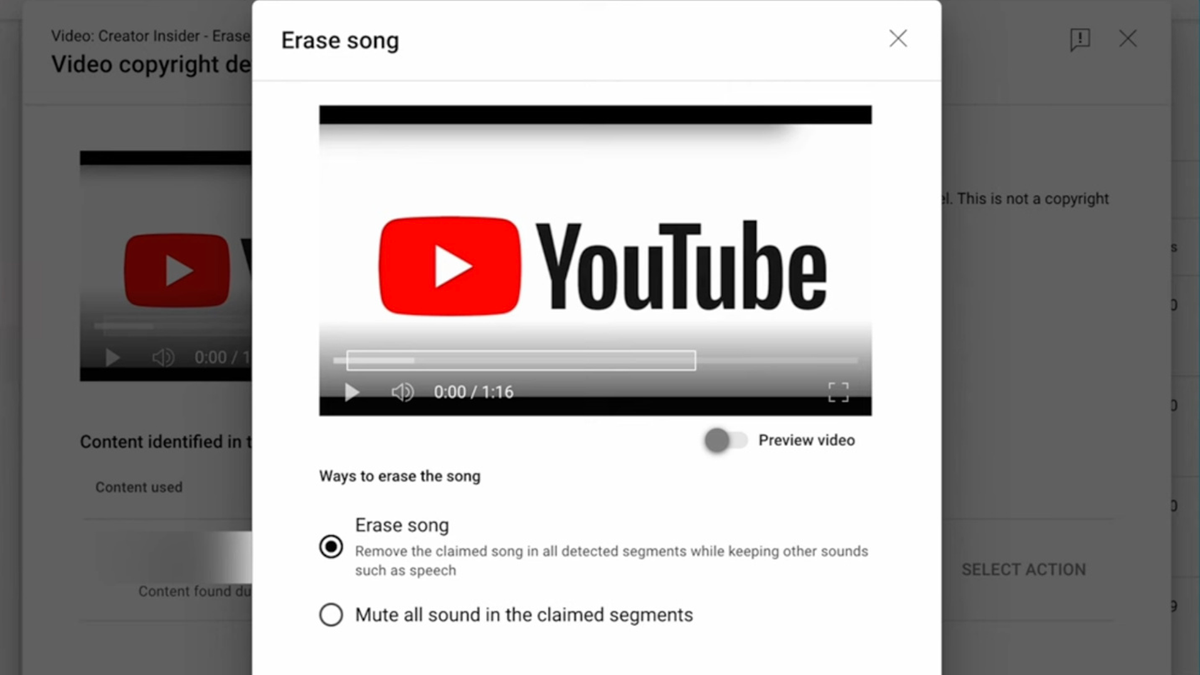
If you lack the required rights, consider replacing the music, muting the affected segment, or removing the claimed audio using the options available in YouTube Studio.
Option B: You have permission
Review the claim details and your documentation. If you have a legitimate basis, follow YouTube’s dispute process and provide accurate information about the rights you hold.
Option C: The claim appears mistaken
Compare the claimed segment with your original file and license. Contact the music service or claimant if appropriate, and retain copies of all relevant messages.
What should a dispute explain?
A dispute should be factual and specific. Depending on your situation, explain the source of the music, the applicable license, and why your use is authorized. Include supporting information where the process allows it.
For example, if the track was created using a service that grants you commercial-use rights under your plan, identify the track and the applicable terms. Do not claim that you own exclusive copyright unless you have a valid basis for that statement.
See YouTube’s official guide to disputing a Content ID claim before proceeding.
8. Can You Monetize YouTube Videos With AI-Generated Music?
AI-generated music can be used in monetized videos when you have the necessary commercial permissions and comply with YouTube’s policies. However, music rights are only one part of monetization eligibility.
YouTube also evaluates whether content complies with its monetization policies, including requirements concerning originality and repetitive or mass-produced content. A video does not automatically qualify for monetization simply because its music is licensed or generated with AI.
Before monetizing a video, check that:
- Your AI music license permits commercial use on YouTube.
- Any samples, lyrics, vocals, or other assets have the necessary permissions.
- You have followed attribution and disclosure requirements that apply to your content.
- Your video complies with YouTube’s current channel monetization policies.
- You have retained enough documentation to explain the origin and permitted use of the track.
Read YouTube’s official monetization guidance for details about commercial-use rights and content eligibility.
9. Does AI-Generated Music Need an AI Disclosure?
Copyright clearance and AI disclosure are separate questions. A track can be properly licensed but still be subject to YouTube’s disclosure requirements, depending on how it was created and presented.
Review YouTube’s current altered or synthetic content policy to determine whether your video needs a disclosure. Do not assume every use of AI requires the same treatment, and do not confuse a disclosure label with a copyright license.
You can start with YouTube’s official guidance on altered or synthetic content.
10. AI Music Copyright Risk Checklist
Use this interactive checklist before publishing a video with AI-generated music. It helps organize your checks; it does not provide legal clearance or guarantee that a claim will not occur.
Pre-upload music review
Select the statements that apply to your track.
11. Common Mistakes That Can Lead to Copyright Problems
Assuming every AI song is copyright-free
AI generation does not automatically remove copyright concerns. Outputs may raise questions about source material, recognizable similarities, contractual restrictions, or rights in the underlying work.
Using a free plan for a monetized video without checking the terms
Some free tiers permit personal use but restrict commercial use. Verify the specific plan and the rules that applied when the track was created.
Buying a license but failing to save it
A receipt may show that you paid for a service, but it might not establish which track is covered or what rights you received. Save the relevant terms and track information too.
Believing attribution alone solves copyright issues
Giving credit is not a substitute for permission when permission is required. Attribution helps satisfy a license condition only when that license actually allows the use.
Disputing every claim automatically
Not all claims are mistakes. Review the evidence and your license before submitting a dispute, and do not make claims about rights you cannot support.
Using an AI clone of a famous singer
Imitating a recognizable voice or recreating a specific song can create issues beyond conventional music copyright, including rights of publicity, platform policies, and contractual restrictions. Avoid using another person’s voice or identity without the necessary authorization.
Frequently Asked Questions
Can AI-generated music still get a YouTube copyright claim?
Yes. AI-generated music can receive a Content ID claim if it matches registered reference material or if a rights holder asserts a claim. The fact that a song was generated by AI does not automatically make a claim invalid.
Is music made with Suno safe for YouTube monetization?
It depends on the track, the plan under which it was generated, and the applicable terms. Suno’s published guidance distinguishes commercial-use rights for eligible paid-plan songs from the non-commercial restrictions associated with its free plan. Check the current official terms for your specific track.
Can I use AI music from a free plan in monetized videos?
Do not assume you can. Some free plans restrict commercial use. Check the service’s current terms and make sure the particular track is licensed for monetized YouTube videos before using it.
Will changing the pitch or speed remove a Content ID claim?
Changing pitch or speed is not a reliable or appropriate way to clear copyright rights. A modified track may still be identified, and altering the audio does not create permission to use copyrighted material. Resolve the underlying rights issue instead.
Is royalty-free music guaranteed to avoid Content ID?
No. Royalty-free describes a licensing model, not a guarantee against automated claims. Check the license, use a reputable source, and retain documentation.
Should I credit an AI music generator in my YouTube description?
Follow the provider’s license and attribution requirements. Some services do not require credit, while certain music-library tracks or licenses may require specific attribution. Credit alone does not replace a license.
Does a Content ID claim mean my channel will get a strike?
Not automatically. A Content ID claim and a copyright strike are different processes. A claim may affect monetization or availability, while a valid copyright removal request can result in a strike.
Can I use AI music commercially if I wrote the prompt myself?
Writing a prompt does not by itself establish commercial rights. You still need to follow the generator’s terms and ensure that the resulting music and any source material can be used for your intended purpose.
What is the safest music option for a YouTube video?
A practical lower-risk choice is music from YouTube’s Audio Library used according to its listed conditions, or original music for which you have documented permission. No source can promise that a claim will never occur.
Official Resources for YouTube Creators
- YouTube Help: Tips to find safe music
- YouTube Help: Content ID claims
- YouTube Help: Dispute a Content ID claim
- YouTube Help: What content can I monetize?
- Suno Help: Commercial rights with a paid subscription
- Suno: Terms of Service
Final Thoughts
The best way to avoid copyright problems with AI music on YouTube is to combine a suitable license with original creative inputs, careful recordkeeping, and a review of YouTube’s copyright checks. Choose a generator based on the rights it actually grants—not simply on whether it can create a song for free.
If a claim appears, investigate it before taking action. Keep your documentation organized, use the official dispute process when you have a valid basis, and consider replacing audio when you cannot establish the necessary rights. These habits will not eliminate every risk, but they can help you publish more confidently and protect your channel.
This article is for general educational purposes and is not legal advice. Copyright laws and AI music service terms can vary by country and change over time. Always review the current terms and policies before publishing.